What is a biometric passport?
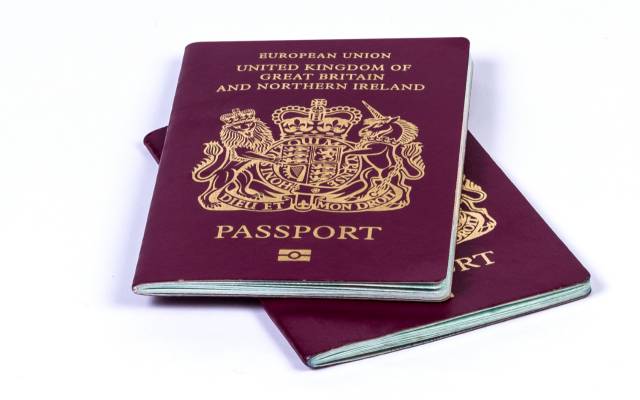
Also known as an ePassport or a digital passport, a biometric passport has an embedded microchip that holds all your personal information. It looks just like a traditional passport but it has the international biometric symbol at the bottom of the front cover.
ePassports were launched in 2006 to tackle the increasing threat of identity theft and terrorism, and since 2010 any renewed or new passports sent to UK citizens have been biometric.
How do biometrics work?
Biometrics analyse physical characteristics that are unique to each individual and can include retinal scans and fingerprints. The chip in your ePassport holds the information about your face – such as the distance between your eyes, nose, mouth and ears - taken from the digital photograph you supply when you apply for your passport.
What’s the point of a biometric passport?
Switching to ePassports was primarily to improve safety and security. The innovative chip can hold a lot of unique data in it, making the passport much harder to replicate or forge. It’s also much easier to identify people using the detailed set of data stored through biometrics.
You'll feel the benefit of travelling with a digital passport when you're able to use the ePassport gate in border control which makes getting through airport security much more efficient.
Using an ePassport at the airport
- Take off your hat, sunglasses, scarf or anything else that might cover your face. (If you wear a veil and feel uncomfortable removing this in public, you have the right to wait for a private room. You'll have to queue at the regular passport gate for this. More information can be found online.)
- Open your passport to the photo page and hold it down on the reader. The instructions will show you which way to place your passport but if there's any trouble, someone will be on hand to assist.
- While holding down your passport, look at the screen in front of you and want until it turns green.
- Once the reader flashes green, you can walk through the gate.
How do I know if my passport is biometric?
If you’ve applied for a new passport since 2010, it will be biometric. The best way to check if you’re unsure though is to look at the front cover of your passport. If there’s a small symbol which looks like a camera near the bottom, then you have a biometric passport.
Do I need a biometric passport?
If you haven’t applied for a passport since 2010 and think you don’t have an ePassport, you don’t need to go out and apply for a new one to enjoy your holidays; your current passport will remain valid until its expiry date.
Travelling to the United States
The only time you’ll need a digital passport to go on holiday is if you’re visiting the States. Since April 2016, Brits going to the USA using the ESTA visa waiver have been required to have a biometric passport.
If you’ve got a trip across the pond planned and you haven’t got a biometric passport, apply as soon as you can. Remember that it can take up to 3 weeks to get your passport, and during the busier months – like the peak summer season – it can take even longer, so don’t delay in applying.